Ethan Nelson-Moore
Oct 24, 2026
Summary My secondary phone, the Maxwest Nitro A65, was infected with Triada malware by a security update a couple months ago. I reported this to Google through multiple avenues and received either no response or nonsensical responses. It is still on Google's list of certified Android devices, and Google Play Protect still reports it as certified. The phone is currently being sold at a deep discount as part of the US government-subsidized Lifeline program which provides phones to people who could not otherwise afford them. I have created a tool that scans Android firmware for malware and have found many more infected devices and novel variants of malware. I plan to publish this tool and more of my findings soon. |
Legal disclaimer
Nothing in this post should be construed to imply that any entity mentioned knows about or condones the distribution of malware. The nature of supply chain attacks means that more than likely only the person who committed the attack was aware of it, and preinstalled Android malware has even been included with seemingly legitimate third-party software, such as face unlock solutions (a previous distribution vector for Triada).
The phone
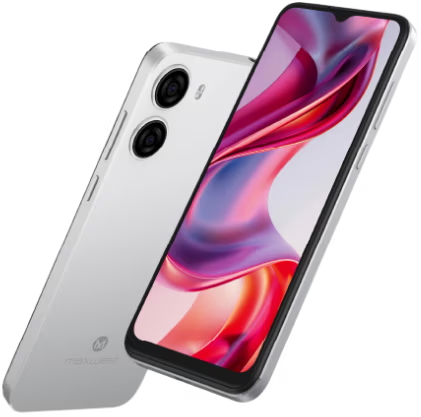
Photo from Gen Mobile's website
I am a professional programmer, IT worker, and data analyst, and I also work on hobby programming projects in my free time. In late July 2026, I bought a Maxwest Nitro A65 Android phone for $33 on eBay because I needed a second Android phone to use for app development. I chose it because it was very cheap but had a modern Android version and an octa-core processor.
You have probably never heard of Maxwest Telecom. That's because they are one of over 3,800 brands of Google certified Android devices. However, their devices are more common than you might think. The Maxwest Nitro A65 is sold at a deep discount by Gen Mobile, a phone carrier which provides Lifeline government-subsidized phone service to people who otherwise could not afford it, as well as prepaid plans. It appears on PassMark PerformanceTest's list of most common Android devices, along with the Vortex J24, another Lifeline phone. Clearly, there are a lot of them out there, likely owned by people who have no other option.
It's honestly not a bad phone. Sure, the interface stutters a lot and the camera is bad (it doesn't even have autofocus, and I think the secondary lens might be fake), but it runs Android 14 and has an octa-core CPU, and in terms of opening and navigating apps and light web browsing, it performs pretty decently. In fact, I would say it's faster at navigating the OS than my Galaxy A15 5G with a better CPU and more RAM, which calls into question Samsung's software optimization. The screen is bright and color-accurate. If I received this phone for free or very cheaply and couldn't afford another option, it wouldn't make me want to throw it at a wall. (This is a major improvement in comparison with some other Lifeline phones, which have specifications straight out of the 2015 low-end, like quad-core processors, 2-megapixel cameras, and 2GB of RAM. Modern apps like Uber struggle to run on that kind of hardware even on older Android versions, so I can't imagine what the experience of using Android 14 on that hardware is like.)
However, none of that matters anymore, because a security update the phone received a couple months ago infected it with malware.
The malware
Something is amiss
The phone shipped with a firmware build from 2024 and a similarly old Android security update, which is unsurprising for a very cheap device. I was pleasantly surprised when it received a security update1 in early September, which also promised performance optimizations.
For about two weeks2, the phone behaved normally. Then, one day, as I was using the phone to watch YouTube, a full-screen ad appeared when I opened the app. I was immediately suspicious, because YouTube never has ads that cover the whole screen outside of videos, and a video had not been playing. When I pressed the recent apps button, I could see that the ad came from an app called "Lock & Hide", which I did not recognize and had not installed. It was not visible in the app drawer, but checking the Settings app revealed that several suspicious apps were installed, including "Lock & Hide", "System", and "Android System"3. They had all supposedly been installed by the Google Play Store, even though I was not signed into a Google account. I tried to remove the apps, only to find that they would be installed again automatically within an hour.
When I opened Google Play Protect to scan the phone for malware, I saw that it had been disabled, which I had not done, and it is not possible for a third-party app to do so without system privileges. Reenabling it resulted in it eventually being disabled again. Googling names of the apps that were being installed revealed that users had been complaining about these and other likely malicious apps being installed automatically for a couple months previously, on both this and other devices, and I realized that the issue must not be isolated to my own phone.
The initial investigation
The fact that the malware was able to disable Google Play Protect and to spoof apps as being installed from the Google Play Store indicated without a doubt that it had system-level privileges, so I decided to factory reset the phone while monitoring its network activity to determine if the infection was integrated into the firmware4. To do so, I used Control D, a paid service which allows you to create custom DNS servers that monitor and filter requests sent to them. I configured an endpoint to log all requests but not filter them, and set up the phone without inserting a SIM card or connecting to Wi-Fi. I configured the private DNS setting (which applies to all network connections) to point at my Control D instance, then connected to Wi-Fi.
I immediately noticed a slew of requests to suspicious and seemingly randomly generated domains, some of which were being queried as frequently as once per minute. I researched the domains and found that several of them were known to be associated with Triada malware, a dangerous trojan which has previously been preinstalled on Android devices.
I collected the following statistics on DNS requests the phone made.
A few of these requests may have been from me testing if I had correctly blocked these domains.
What is Triada?
Triada is a family of multifaceted Android malware combining adware, account takeovers, spam, proxyware, and cryptocurrency stealing into one increasingly stealthy package. As of this writing, it has been around for over a decade, and despite Google's previous efforts to combat it, it survives in much the same form to this day. Extensive analyses have been made of its capabilities and history, and I will summarize them here.
Triada originated as a trojan embedded into apps, which would root the device and modify system libraries to include malicious code. When protection against firmware modification in Android rendered this impossible, it pivoted to being preinstalled on devices from the factory. In one instance documented by Google, a vendor of face unlock software bundled Triada along with their software, which was added to phones by unsuspecting manufacturers. It would not surprise me if the creators of Triada were paying employees of manufacturers to add it to firmware. I would guess that preinstalled malware is more common on very cheap devices because profit margins are slimmer and there is more incentive to find other sources of income throughout the supply chain.
How does Triada affect users?
While the most visible effect of Triada is its popup ads (from which the operator makes money), it also engages in schemes that are much more dangerous, and unfortunately, much more profitable. It has been known to tamper with cryptocurrency apps to steal money, a venture which had made the operators at least $264,000 as of April 2025, according to Kaspersky researchers. It also hijacks social media accounts to send spam, redirects web browser pages to ads, uploads cookies for social media accounts allowing full account takeover, and allows the registration of accounts using the phone owner's phone number by intercepting two-factor authentication messages, also according to Kaspersky. The former and latter behaviors have been reported by real-world users. The operators of another similar preinstalled trojan sell access to this functionality, and it is reasonable to conclude that the Triada operators do the same.
The preinstalled variants of Triada have been reported by Google and Kaspersky to be embedded into a core system library, libandroid_runtime.so, which means that Triada's code can run in all apps on the device. libandroid_runtime.so contains code critical to the operation of Android and cannot simply be removed. It also usually cannot be replaced with a copy from another device, because its code differs depending on the Android version, security patch level, CPU manufacturer, and even device manufacturer. Furthermore, the device would need to be rooted to do this, which is often very difficult for little-known devices with no available firmware or developer community (as is the case here). Rooting also brings its own security issues and prevents banking apps and some games from working.
All this leads to the alarming conclusion that a device infected with Triada is completely unsafe to use, and there is no way to fully remediate the infection yourself. If you have used a device known to be infected with Triada (such as the Maxwest Nitro A65), you should stop using it immediately, change the passwords of all accounts you used on the device, log out all unknown sessions logged into those accounts, and check social media apps for accounts registered using your phone number. Unfortunately, that leaves people who cannot afford another phone with no good options.
Confirming the infection
I extracted /system/lib/libandroid_runtime.so from the device using ADB and confirmed that it contained Triada code.
It contains the string "os.config.ppgl.status", which has been associated with Triada since at least 2017. Overall, the code injected into libandroid_runtime.so is very similar to previous versions of Triada, but the names of the injected functions have changed to ___andver_log_println and ___andver_log_init.
Triada is known to set several Java properties (not to be confused with Android system properties) whose names begin with os.config in apps where its code is running. I created a test app to list all Java properties and used it to verify that Triada code is in fact being injected into apps. The code I used is available in the appendix.
The injected properties I discovered were the following:
* The property "os.android.version.sure.b" is mentioned in a very suspicious post attempting to get it excluded from Kaspersky antivirus.
** The property name "os.config.facelock.init.state" suggests that Triada may have been delivered via third-party face unlock code, as has previously been the case. It could also be a false flag by Triada developers, however.
I also scanned the phone with Kaspersky antivirus, and it detected Triada in libandroid_runtime.so.
On October 7, 2026, after I had already reported this issue to Google, an interesting twist emerged in this story. The antivirus company Bitdefender published an article describing a strain of preinstalled Android malware they termed "Midnight Mimosa". The names of the installed apps are consistent with those I saw, and the Nitro A65 is even on their graph of the most common infected devices, but their analysis misses a crucial fact: at least on some devices, the real cause is Triada! During their analysis, the Bitdefender researchers appear to have simply assumed that the infection vector was always a preinstalled system app due to system permissions being necessary for the malware's actions, when in fact the malicious app was sometimes being installed by Triada.
I confirmed this hypothesis by downloading an older firmware for one of the infected devices, the Cubot KingKong X, extracting it, and determining that it contained Triada in libandroid_runtime.so, but that the suspicious app mentioned by Bitdefender was not preinstalled. Thankfully, that device got an update to remove Triada.
Reporting attempts
A reenactment of my attempts to contact Google and Maxwest (credit)
Unfortunately, my attempts to report this vulnerability to Google and Maxwest have been met with either silence or nonsensical responses.
Timeline
Thank you for taking the time to submit this report to the Android & Google Device Vulnerability Reward Program!
We have investigated this issue and determined that this is not a security vulnerability.
We have logged this issue for potential remediation in a future version. At this time, this report is considered closed and will no longer be monitored.
If you believe this is an error, please submit a new report through the BugHunter portal and include all necessary information on why this is a valid vulnerability according to our published severity guidelines (1).
Hello,
Thank you for reaching out!
If you believe you've identified an issue in scope for one of our vulnerability reward programs, please check our rules and scopes, and submit a vulnerability report via the Bug Hunters portal for evaluation.
Thank you again for working with us to keep our platforms safe!
Best,
The Play and Android Security Team
This was despite the fact that I had explained in that very email thread that I had already tried to report the issue via the Bug Hunters portal (a.k.a. the VRP portal) and it had been closed.
Other than the nonsensical responses detailed above, I have not received any communications from Google, Maxwest, or anyone I have reached out to directly. The phone has not received an update to remove the malware, and it still passes Google Play Integrity checks and appears on Google's list of certified Android devices. Therefore, I decided to write this blog post to draw attention to the issue.
Not just one phone: Preinstalled Android malware is far from dead
In addition to researching this issue, I have developed a computer-side tool which can scan Android firmware for both known malware and suspicious code patterns. I have uncovered numerous other certified Android devices infected with Triada, BADBOX, and Lemon Group malware, including previously unreported infection locations and code variants. Some of these devices are also Lifeline-subsidized. I plan to publish analyses of other preinstalled malware, as well as my scanning tool, within the next couple months. The tool will be open-source, and will initially only run on Linux (or Windows Subsystem for Linux).
I am also planning to create an Android app which users can use to scan their devices for preinstalled malware. Data from the app will be manually confirmed and used to create an online database of devices with (and without) preinstalled malware. The development of this app is likely to take several months, and the website longer still.
Google heavily advertises the security and safety of certified Android devices, stating the following (emphasis mine):
We provide hundreds of tests to ensure Play Protect certified devices adhere to the Android security and permissions model and have software builds with recent security updates. Play Protect certified devices are also required to ship without pre-installed malware and include Google Play Protect, a suite of security features such as automatic virus scanning and Find My Device. This provides baseline protection against malware, privacy hacks and more.
Unfortunately, Google's certification process is not living up to that promise. It is clear that Google's existing checks for preinstalled malware, for example via the Build Test Suite, are failing to catch new strains of malware. Owners of Android devices, regardless of how much they paid for their device, deserve to have their personal data protected.
How should this issue be resolved?
The most immediate outcome of publicizing this issue should be to have the malware removed from the Maxwest Nitro A65 via an update. The firmware build which contains Triada should also be decertified so that Google Play Protect does not show "Device is certified" on affected devices, giving users a false sense of security.
Ideally, the changelog for the update removing the malware should make the severity of the issue clear and suggest that users change their passwords, log out of unknown sessions, and check for accounts made using their phone number, as mentioned above. Updates which have removed preinstalled malware on other devices have often failed to indicate the severity of the issue, or even that there was malware at all.
The more long-term aim of publicizing this and similar issues is to enable Google to integrate my findings into the Build Test Suite and scan existing firmware images, potentially uncovering more affected devices that have not been reported by users. I also hope that mobile antivirus companies will integrate my findings.
Indicators of Compromise
Infected libandroid_runtime.so (SHA256: 2de2340e04947c87ce92b3a950c501c276fe2bfdc06e7aba3b8c3d4e5e9045b6):
Download (password: malware)
Strings contained in libandroid_runtime.so:
Domains:
Java properties (check via System.getProperty()):
Contact me
If you would like to contact me regarding this or other preinstalled Android malware, you may open an issue on this repository, or email me directly at enelsonmoore at gmail.
Appendix: Java property dumping code
private static final String TAG = "TriadaPropDump";
public static void dumpProps() {
final Properties systemProperties = System.getProperties();
final Set<String> keys = systemProperties.stringPropertyNames();
for (final String key : keys.stream().sorted().collect(Collectors.toList())) {
Log.e(TAG, "dumpProps: key: " + key);
final String value = systemProperties.getProperty(key);
Log.e(TAG, "dumpProps: value: " + value); // value can be null!
}
}
adb shell settings put system init_time $(((`date --date='20 days ago' '+%s'`)*1000))
adb reboot